The platform

Everything about one item, in one place, already written down

TempTag is not a folder of forms. It is a register of physical things: a scaffold, a prop run, a trench box, a deck of falsework. Every brief, check, permit, inspection, defect and signature attaches to the thing it is about. Open the item and the answer is already there.

Four things it is built to stop

Each of these is a failure people describe in almost the same words, on almost every scheme. They are the reason the product is shaped the way it is.

Work loaded before it was signed off

A permit to load is a hold point in the workflow, not a form filled in afterwards. Until a named appointed person issues one, the item does not read as safe to load: on the register, on the tag, or to anyone who scans it.

A check nobody can find

The independent design check, the category decision and the acceptance all live on the brief that triggered them. There is no version of this where the evidence is sitting in somebody’s inbox.

A defect that stayed local

A critical defect changes the state of the item on the register, the tag and the public view, as soon as the phone has signal. It is not a note in a pad that reaches the office on Friday.

An appointment that quietly lapsed

Appointments carry limits, evidence and an expiry, and the platform tracks the renewal, so the competence behind a signature is still valid at the moment the signature is given.

The item record

Open an item. Twelve panels, already filled in.

This is the centre of TempTag, and everything else on this page writes into it. A coordinator lives on the register, a supervisor works from the phone, an auditor asks one question, and all three are looking at the same record, assembled out of work people were doing anyway rather than typed up for the occasion.

01 Status Awaiting permit, loaded, do-not-use, struck. One state, shown identically on the register, on the tag and to anyone who scans it.
02 Design brief The requirement that started the item, who raised it, who reviewed it, and what they accepted.
03 Category & check The category that decides how much checking the item needs, the independent check itself, and the acceptance recorded against it.
04 The tag Which NFC tag is allocated, when it was fitted, and what a scan of it shows right now.
05 Permits Permit to load, to strike, to dismantle. Who issued each one, under which appointment, and whether it is still live or revoked.
06 Inspections Every check made against the item, on the interval its regime sets, with the photographs and the inspector attached.
07 Defects & actions What a failed check raised, who owns it, when it is due, and what evidence closed it.
08 Handover The certificate issued to the people who will actually use the works, carrying the scope handed over and the limits on it.
09 People Who is appointed to this item and to what, with the competence record sitting behind the appointment rather than beside it.
10 Documents Drawings, calculations, certificates and site photographs held against the item, not filed in a folder named after a month.
11 Location The project, the site, and where on that site the item physically stands.
12 History Every change to any of the above, attributed and timestamped, so you can see who moved the item to do-not-use and when, without asking anyone.

A record showing that an inspection happened is evidence that it happened. It is not an engineering judgement that the works are safe. That judgement stays with the temporary works coordinator, the designer and the competent people appointed to it: the platform holds the evidence, it does not form the opinion.
Capabilities

What is in the console today

These are the areas the console covers. What is specified but not built is at the bottom of this page, labelled as such, and we would rather you found it here than in a demo.

The record

What exists, what state it is in, and the paper trail that got it there.

Design briefs

Capture the requirement on the project, send it for TW coordinator review, and hold the acceptance and the issued design against the same brief, with the evidence attached. The brief is where the thread starts, so nothing downstream exists without one.

Design & check

Category rules decide what level of check an item needs. The independent check and its acceptance are recorded against the brief, and the Category 0 library covers the standard solutions so a repeat job is not re-designed from scratch.

The TW register

Every item, its status, its location, its last inspection and its next due date. An accepted brief becomes a register item and is allocated a tag. This is the screen a coordinator lives in and the one an auditor asks for.

Projects & locations

Every project on a map, with its work packages and its subcontractor access in one register, so a programme of six schemes is not six disconnected jobs on six different spreadsheets.

The work

What happens to the item on site, and the hold points around it.

Inspections

Your own checklists, captured offline on a phone, with photo evidence against the name of the inspector. A critical defect raises the action and puts the item on do-not-use. Out as a Schedule 7 report when you need one.

Permits & hold points

Permit to load, permit to strike and permit to dismantle, issued against one item by a named, appointed person, tracked, and revocable. The hold point is the point: nothing takes load until the permit exists.

Handovers

A handover certificate to the people who will actually use the works, carrying the scope and the limits of what was handed over. The thing most often agreed verbally, written down.

Actions & defects

Defects raised from failed checks, assigned to an owner with a due date, chased, and closed with evidence rather than a tick. One register for every open thing on the scheme.

The people

Who is allowed to do it, on what evidence, and who else is on the job.

Appointments

Who is appointed, to what, with what limits and on what evidence. A letter of appointment is generated on issue, acceptance is recorded, and expiry and renewal are tracked rather than remembered.

Competence

Competency records, CVs and role matrices held against the person, with an organisation chart showing who is appointed to what across your projects. The evidence behind an appointment sits with the appointment.

Contractor oversight

Bring subcontractor organisations onto the project, scope what each one can see, and handle scaffold requests and approvals in the same place as the work. The paperwork stays on the job.

The proof

What you can show somebody standing next to the item, or sitting in an audit.

Public verification

Anyone standing next to the item can scan its tag and see the current status without an account. The public view deliberately shows less than the record behind it.

On site

The console is for the office. The phone is for the scaffold.

Nobody carries a laptop up a tower. The field app is the same record seen from the work: scan the tag, the right checklist opens against the right item, photograph what is wrong, sign, move on. It holds everything locally when there is no signal and syncs the moment there is one, so an inspection is never waiting on a bar of reception.

  • Tap an NFC tag with the phone people already carry. There are no scanners to buy, and no code to photograph in the rain.
  • Works fully offline and syncs on its own. Nothing is retyped back at the office.
  • A failed check raises the defect there and then, with the photograph attached to it.
  • On a shared site phone it asks who is signing before it will take the record, so the inspection carries a person and not a device.
  • Android is live. iOS is in beta, and it says so rather than implying otherwise.
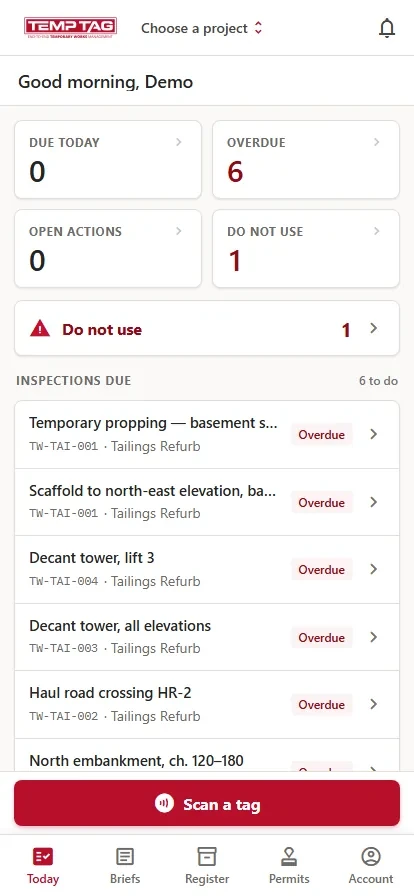
The field app's Today screen, showing what is due and what is overdue
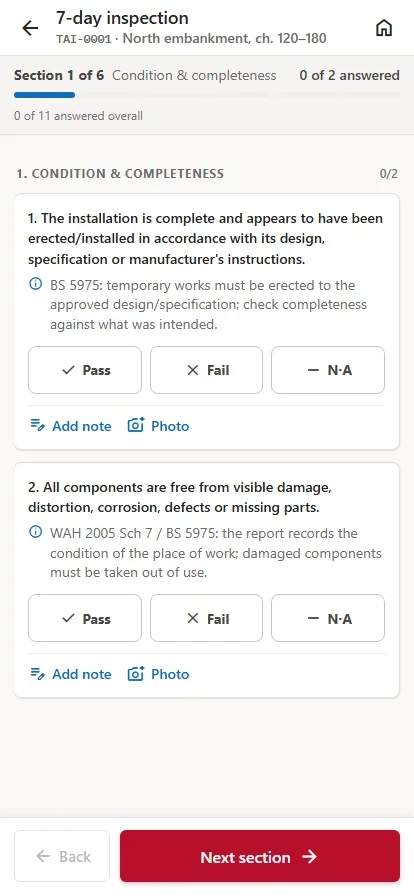
Working an inspection checklist on the field app
On the roadmap, not shipped

Reporting & Power BI

Schedule 7 reports and register exports ship today. The Power BI reporting feed is specified and on the roadmap. It is not shipped, and it is listed here as a roadmap item rather than a capability.

How access works

Scoped to the project a person is actually on

Role-based access

What a person can see and do follows their role and the projects they are assigned to, not a global switch somebody flipped once.

Tenant isolation

Each organisation's data is separated by default. Enterprise adds white-label branding, so the console and the exports carry your logo and your brand colour.

Audit trail

Every record carries who changed it and when, and the history sits on the item rather than in a log somebody has to go and find.

Public tag view

Anyone can scan a tag and see that item's current status without an account. The public view deliberately shows less than the record behind it.

See it on one of your own schemes

Thirty minutes with a temporary-works specialist, walking a job you recognise rather than a canned demo. No obligation and no sales script, and if you already know what you need, order your tags instead.